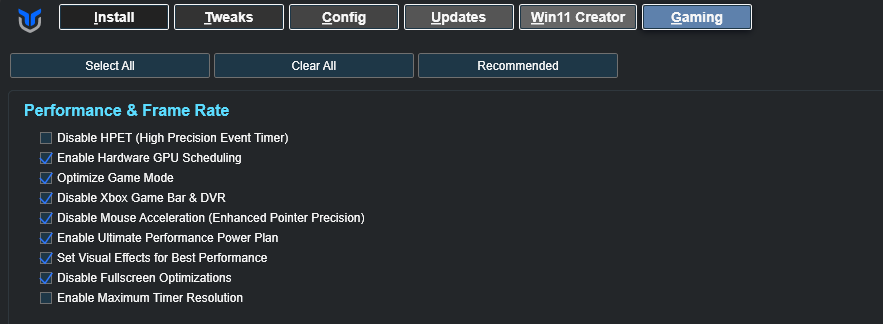
I’ve been working on a specialized fork of the WinUtil script, specifically focused on a dedicated Gaming Tab. My goal is to strip back the general utilities and build a streamlined, high-performance interface specifically for gamers and streamers.
This is my first deep dive into the WPF interface used in the original script, and it’s been a great learning process! I’ve successfully “gutted” the base to make room for gaming-specific logic while keeping the UI framework intact.
Current Features / Planned Additions:
-
Latency Optimizations: Tweaks for TCP/Network responsiveness.
-
Process Priority: One-click GPU/CPU priority for active games.
-
System Cleanup: Specialized debloating for background services that interfere with FPS.
-
Streamer Mode: Quick toggles for privacy and performance while broadcasting.
I’m looking for some feedback from the community:
-
Are there specific gaming tweaks you feel are “must-haves” for a standalone tool?
-
For those familiar with the WinUtil WPF structure, any tips on keeping the code-behind clean as the tab grows?
I’m excited to share my progress and eventually contribute this back to the ecosystem!